
Bolt How-To’s
Temporarily disable spam blockers on Android
- 1. Open the Phone app

- 2. Open the Menu in top left corner, then tap Settings

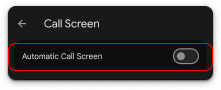
- 3. In the Call Assist section, tap Call Screen
 , turn off Automatic Call Screen.
- 4. Go back to Settings , and scroll down to the General section, tap
 Blocked Numbers, turn off Automatic Call Screen.
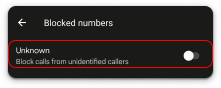
Special Instructions for Samsung phones:
- Open Samsung Phone app
- Tap Settings (three dots), tap Block numbers, then
- Turn off Block calls from unknown numbers.
- 5. Open your third party spam call blockers (i.e., Verizon Call Filter, AT&T ActiveArmor, or T-Mobile Scam Shield) and turn off spam blocking.
- 6. After you have completed your test call...
- Add the phone number that called you to your Contacts
- Turn your blockers back ON. (... because robocalls suck.)
Still need help? Contact support.