
Bolt How-To’s
Temporarily disable spam blockers on iPhones
- 1. Open Settings

- 2. Scroll down and tap Apps

- 3. Scroll down and tap Phone

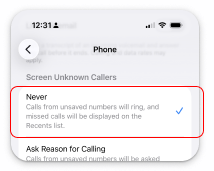
- 4. Scroll down to Screen Unknown Callers, and select Never
- 5. Scroll down to Call Blocking & Identification, turn off Silence Junk Callers.
- 6. Turn off third-party call blocking apps (Verizon Call Filter, Hiya, Truecaller, etc.) if you have them installed.
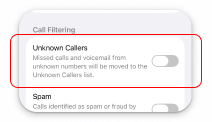
- 7. Turn off Call Filtering filtering: Scroll down to the Call Filtering section, then turn off Unknown Callers.
- 8. After you have completed your test call...
- Add the phone number that called you to your Contacts
- Turn your blockers back ON. (... because robocalls suck.)
Still need help? Contact support.